A Guide to GitHub Secret Scanning
Exposed secrets like API keys and tokens are a massive blind spot in software development. Think of them as leaving the key under the doormat for your entire digital infrastructure. GitHub Secret Scanning is your first line of defense, a built-in watchdog designed to automatically spot these credentials in your repositories before a bad actor does.
Its job is simple but critical: find secrets the moment they're committed and stop a potential disaster in its tracks.
The Hidden Dangers in Your Codebase
In the rush to ship features, it’s frighteningly easy to overlook the small details that carry immense risk. One of the most common—and dangerous—is hardcoding secrets directly into source code. An API key here, a database password there. It feels convenient at the moment, but it creates a ticking time bomb.
Once a secret is pushed to a repository, it’s no longer secret. Malicious bots are constantly scanning public platforms like GitHub for these exposed credentials, using automated tools to find and exploit them in seconds. The scale of this problem is staggering, with real-world incidents like the widespread issue of sensitive data leaks, such as the 2.3 million credit and debit cards leaked on the dark web due to infostealer malware, showing just how devastating the consequences can be.
Why Hardcoded Secrets Are So Risky
The danger isn't limited to public projects. Even in private repos, secrets can leak through accidental publication, unauthorized access, or insider threats. The fallout from a single exposed key can be catastrophic:
- Data Breaches: An exposed credential can give an attacker a direct line to your customer data, internal databases, and critical systems.
- Financial Loss: Attackers love finding cloud API keys. They can use them to spin up massive server farms for crypto mining, leaving you with a jaw-dropping bill.
- Supply Chain Attacks: A compromised token for a packaging service or a critical dependency can become a gateway for attackers to inject malicious code into your applications, putting all of your users at risk.
The real kicker is this: once a secret hits your Git history, it should be considered permanently compromised. Removing it with a later commit doesn't actually erase it. Anyone who knows where to look can still dig it out of the repository's history. Reactive cleanup just isn't enough.
This guide will show you how GitHub Secret Scanning acts as a critical safety net. We'll break down how it works, what it can and can't do, and how to build a security strategy that goes beyond simple detection to proactive prevention, locking down your code from the ground up.
How GitHub Secret Scanning Actually Works
Think of GitHub Secret Scanning as a tireless security guard for your code, constantly on the lookout for exposed credentials. Its real power isn't just random text searching; it's a massive, collaborative library of detection patterns built with hundreds of service providers.
Here's how it works in practice: companies like AWS, Google Cloud, and Slack know exactly what their API keys and tokens look like. They give GitHub the unique formats—the "fingerprints"—for those secrets. This partnership lets GitHub scan code with incredible precision, telling the difference between a real AWS key and a random string that just happens to look similar.
The adoption numbers speak for themselves. Today, over 3.5 million repositories have secret scanning enabled to stop accidental leaks before they become disasters. This isn't a niche feature; it's a clear sign that automated security checks are now a fundamental part of modern development. You can dig deeper into these trends with these GitHub security statistics.
This whole process can be boiled down to a simple but critical workflow: code gets written, scanning checks for danger, and your repository stays protected.
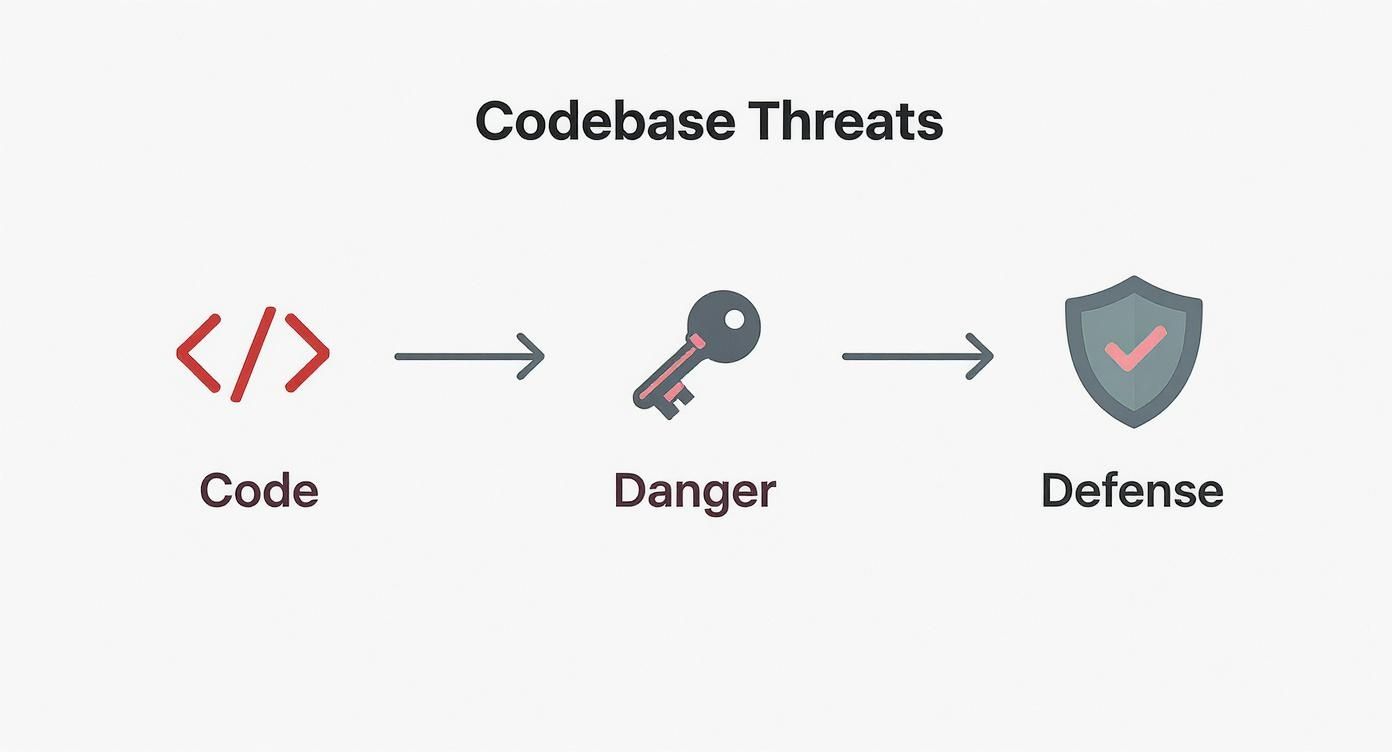
The scanner acts as a crucial checkpoint, intercepting exposed keys before an attacker ever gets a chance to use them.
Differentiating Post-Commit Scans and Push Protection
GitHub Secret Scanning actually offers two very different layers of defense that kick in at different times. Getting the distinction is key to building a truly solid security strategy.
The most common method is post-commit scanning. When you flip this feature on for a repository, GitHub does two things:
- It scans your entire Git history, looking for any secrets that have ever been committed.
- It continuously monitors every new commit pushed to the repository from that moment on.
If a secret turns up, an alert is fired off to repository admins. For public repositories, GitHub even notifies the service provider who issued the token so they can take action.
But here’s the catch: post-commit scanning is reactive. The secret has already been written into your Git history. Even if you remove it later, you have to assume it's been compromised. This is where the next layer comes in.
Push protection is the proactive, more powerful feature available with GitHub Advanced Security. Instead of waiting for a commit to land, it scans your code before the push ever completes.
If a secret is found, GitHub blocks the push entirely and tells the developer what happened right in their command line. This is a game-changer because it stops secrets from ever touching your repository's history in the first place. It’s the difference between cleaning up a spill and preventing it from happening at all.
To make this crystal clear, here’s a quick breakdown of the core features and what they protect.
GitHub Secret Scanning Features at a Glance
| Feature | Protection Type | Scope | Primary Benefit |
|---|---|---|---|
| Historical Scan | Reactive | Entire Git history of a repository | Finds secrets already committed in the past. |
| Post-Commit Scan | Reactive | Every new commit pushed to the repo | Detects newly exposed secrets immediately after they land. |
| Push Protection | Proactive | Code changes before a push is accepted | Prevents secrets from ever entering the repository history. |
Ultimately, combining these proactive and reactive measures gives you the most comprehensive defense against accidental secret leaks. You get the immediate, preventative stopgap of push protection backed by the safety net of continuous post-commit scanning.
Understanding the Escalating Problem of Secret Sprawl

The problem of exposed credentials is way bigger than most engineering teams think. We're not just talking about one or two accidental commits. We’re dealing with secret sprawl—the uncontrolled, often invisible spread of credentials across your entire digital footprint.
Think of it like a leaky faucet. A single hardcoded key might seem like a small drip, but over time, it creates a flood. Secrets get copied into developer environments, cached in CI/CD logs, embedded in wikis, and forgotten in old feature branches. This sprawl blows up your attack surface, creating hundreds of potential backdoors for attackers.
And this isn't some niche problem. It's a full-blown epidemic. According to GitGuardian's State of Secrets Sprawl Report, nearly 24 million new hardcoded secrets were found on public GitHub repositories in just one year. That's a 25% jump from the year before, proving this issue is getting worse, not better. You can read more about the growing problem of secret exposure directly from GitHub.
Where Secrets Are Hiding in Plain Sight
The kinds of secrets getting leaked are all over the map, too. It’s not just API keys anymore. We're seeing everything from database connection strings and private SSH keys to OAuth tokens and cryptographic certificates. Each one unlocks a different part of your infrastructure.
Here are some of the most common—and dangerous—places secrets love to hide:
- Public and Private Repositories: The most obvious spot, where a developer commits a secret by mistake.
- Git History: Even if you "delete" a secret, it's still buried in the commit history, waiting for someone to find it.
- Developer Workstations: Think
.envfiles, shell histories, and local config files. They're goldmines for credentials. - Internal Tools: Secrets get hardcoded into wiki pages, pasted into Jira tickets, and shared over Slack all the time.
One of the most overlooked parts of this problem is how long these secrets stay active. Many leaked credentials remain valid for weeks, months, or even indefinitely, creating persistent, exploitable backdoors long after the initial leak.
The Real Cost of Unchecked Sprawl
When credentials are scattered everywhere, security becomes a nightmare. Auditing is impossible, key rotation is a mess, and every developer’s laptop becomes a potential point of failure.
Without a solid GitHub secret scanning strategy, organizations are essentially flying blind, completely unaware of the thousands of exposed keys that could give an attacker the keys to the kingdom. This is why we need to move beyond simple detection and start thinking about proactive prevention, which is exactly what we'll cover next.
How AI Coding Assistants Amplify Secret Leaks
AI coding assistants like GitHub Copilot are fantastic for productivity, but they’ve quietly introduced a new, sneaky security risk. These tools learn from mountains of public code and your own repos, which means their code suggestions can be a double-edged sword.
As an AI whips up a block of code, it might toss in placeholder credentials or—even worse—real secrets it picked up from its training data or your immediate context. A developer, laser-focused on logic and moving fast, can easily hit "Tab" to accept the suggestion and commit it, completely missing the sensitive data buried inside.
This isn't just a hypothetical problem. The data tells a clear story. Repositories with GitHub Copilot enabled have a secret leakage rate of 6.4%. That’s roughly 40% higher than the 4.6% rate found in repos without it. It's a stark reminder that AI can accelerate accidental exposure just as fast as it accelerates development.
The New Reality of AI-Driven Leaks
The problem isn't that AI assistants are malicious; it's that they fundamentally change how we write code. Developers are now co-writing with a partner that has zero concept of a "secret." This opens up new pathways for credentials to leak that our old security models just weren't built to handle.
These new pathways include things like:
- Contextual Oversharing: The AI might spot an API key in an open file or an environment variable in your editor and helpfully suggest it in a completely different file.
- "Ghost" Secrets: Sometimes, the AI suggests credentials it saw in its public training data. These could be old, leaked secrets from other projects that a developer then uses as a template, not realizing they’re real.
- Accidental Acceptance: In the flow of coding, it's incredibly easy to accept a multi-line suggestion without meticulously scanning every single line for a stray password or token.
The real challenge here is that AI-generated code looks right. It’s functional, it makes sense, and it’s easy to overlook the security bomb ticking inside it. This forces us to rethink how we approach code review and security validation from the ground up.
This explosion in secret leaks is just one piece of a much larger security puzzle. It's not just about stopping leaks; it's about understanding the broader landscape of AI-powered cyber threats to build a truly robust defense.
Ultimately, while GitHub secret scanning is an essential safety net, the rise of AI assistants makes one thing crystal clear: security needs to shift left, way earlier in the process—before the code is ever committed. You can learn more about tackling these new challenges in our guide to common AI-generated code issues.
Configuring Your Secret Scanning Policies
Alright, let's move from theory to practice. A security feature is only as good as its configuration, and getting your GitHub secret scanning policies dialed in is what turns a cool concept into a real-world defense for your code. The goal here is simple: build a safety net that catches credentials without getting in your team's way.
For any organization, step one is flipping the switch across all your repositories. You can—and should—turn on secret scanning and push protection by default for every new public repository you create. This sets a baseline of security from day one. For the repos you already have, you'll need to head into the "Code security and analysis" settings and enable it manually.
Enabling Scans for Private Repositories
While secret scanning for public repos is free, your most sensitive credentials are almost certainly living in your private codebases. Protecting them requires a GitHub Advanced Security (GHAS) license. This unlocks scanning for all your private and internal repositories.
Is it worth it? One report found that 35% of private repositories contain exposed secrets. That makes GHAS less of a luxury and more of a necessity for any company that's serious about security.
Once you have the license, the setup is pretty straightforward:
- Head over to your organization or repository settings.
- Find the "Code security and analysis" tab.
- Enable "GitHub Advanced Security" features.
- Switch on "Secret scanning" and—this is crucial—"Push protection."
Think of it like this: Secret scanning is the smoke detector that constantly monitors for problems, while push protection is the fire sprinkler that stops the fire from starting in the first place. You really want both.
Creating Custom Detection Patterns
GitHub’s built-in patterns are great—they cover hundreds of common token formats from major providers. But they can't possibly know about the proprietary API keys for your in-house tools or the specific format of your internal database connection strings. That’s where custom patterns come in.
Using regular expressions (regex), you can teach GitHub secret scanning exactly what your organization's unique secrets look like.
You might create patterns for things like:
- Internal service auth tokens that follow a proprietary format.
- Unique database connection strings for your custom services.
- Special API keys used by your homegrown applications.
This is what takes your security coverage from "good" to "great." Custom patterns ensure the credentials unique to your environment are just as protected as common ones like AWS keys or Slack tokens. You're essentially creating a tailored security shield that fits your company perfectly, catching leaks that a generic scanner would completely miss.
Shifting Left with Pre-Commit Scanning
While GitHub's native scanning is a critical safety net, it mostly kicks in after the damage is done. A truly solid security posture is about catching secrets before they ever touch your repository. This preventative strategy is what we call "shifting left"—embedding security checks into the earliest possible stages of your workflow.
The problem with post-commit scanning comes down to a harsh reality of Git: once a secret is in your commit history, you have to assume it's compromised forever. Sure, you can remove it with another commit and force-push, but the original commit still exists. Attackers are savvy enough to find these "dangling" commits in GitHub's event logs, digging up credentials you thought were long gone.
This makes reactive cleanup a fundamentally flawed approach. The only foolproof way to keep a secret safe is to stop it from ever being committed in the first place.

This is the ideal state—protection that lives right inside the development environment, stopping leaks at the source.
The Power of Real-Time, In-IDE Scanning
This is where pre-commit and in-IDE scanning tools become absolute game-changers. Instead of waiting for a git push, these tools analyze your code as you write it, right inside your editor. Think of it as an intelligent co-pilot, flagging potential secrets the moment you type or paste them.
Tools like kluster.ai provide this instant feedback, effectively blocking secrets before you even run git commit. This approach has some serious advantages:
- Immediate Feedback: Developers get alerted to exposed secrets instantly, letting them fix the issue on the spot without breaking their flow.
- Contextual Prevention: The check happens locally. Credentials never even leave the developer's machine, which completely eliminates the risk of them ever hitting the repository.
- Reduced Security Friction: It kills that frustrating cycle of pushing code, waiting for a CI/CD pipeline to fail, then digging through Git history to clean up the mess.
By integrating security directly into the IDE, you transform GitHub secret scanning from a reactive safety net into part of a proactive, defense-in-depth strategy. It’s the difference between having a security guard at the door versus one who only shows up after a break-in.
This shift-left approach also fits perfectly with modern development practices. As you tighten up your security protocols, it’s worth reviewing the best practices for code review, since pre-commit scanning automates a huge part of that process. It empowers developers to own security from the very first line of code, creating a more resilient and efficient development cycle. This preventative layer doesn't replace repository-level scanning; it works alongside it to build a much stronger, more complete security posture.
Got Questions About Secret Scanning? We've Got Answers.
When you're dealing with something as critical as repository security, the practical, day-to-day questions are what matter most. Let's break down how GitHub's secret scanning works in the real world.
What Actually Happens When GitHub Finds a Secret?
It depends on where the secret is found.
If it's in a public repository, things move fast. GitHub automatically alerts the service provider who issued the token. That provider—think AWS, Google Cloud, etc.—validates it and almost always revokes it immediately. This is a huge safety net for the open-source world, shutting down a potential breach before it can even start.
For private repositories (with a GitHub Advanced Security license), the process is a bit different. GitHub creates an alert right in your repository’s “Security” tab. This kicks off your internal workflow, notifying your team to jump on it. And if you have push protection turned on, the commit containing the secret gets blocked outright. It never even makes it into your history.
The bottom line is this: a detected secret always triggers an action. It's either an automated revocation by the provider or an urgent alert for your team to handle.
Can GitHub Scan for Our Company's Custom Secrets?
Yes, it can, but there's a catch: you need a GitHub Advanced Security license. With that, you can define custom patterns using regular expressions (regex) for your private repos.
This is an incredibly useful feature. It lets you teach GitHub how to recognize your company's unique internal secrets, which could be anything from:
- Proprietary API keys for your internal microservices.
- Unique database connection string formats.
- Custom-formatted tokens for internal tools.
Without this, you're blind to a whole class of potential leaks. Custom patterns give you protection that’s actually built for your infrastructure.
So, Is GitHub Secret Scanning All I Need?
Not quite. While it's an absolutely essential security layer, it's best to think of it as a safety net. It's fantastic at catching credentials that have already been committed to your repository's history.
A truly robust security strategy means "shifting left"—catching problems earlier. That means using pre-commit hooks and real-time IDE scanners to stop secrets from ever being committed in the first place. You need both: prevention to stop most secrets and detection to catch the ones that slip through.
For a truly proactive defense, kluster.ai provides real-time, in-IDE secret detection that stops vulnerabilities before they're ever committed. By catching secrets as you code, you can eliminate security friction and ensure your repositories stay clean from the start. Learn how to prevent secret leaks with kluster.ai.