
A Modern Guide to Security Code Review
A security code review is simply a systematic process of digging through an application's source code to find and squash security bugs. It’s a proactive step, designed to catch flaws before they can be exploited in a live environment, which is why it's a non-negotiable part of any secure development lifecycle.
Building Your Security Review Foundation
A successful security code review is more than just a bug hunt. It’s a structured process that needs a solid foundation built on clear objectives, well-defined roles, and a practical scope.
Without this initial planning, review cycles can easily become chaotic, unfocused, and disconnected from actual business risks. Laying this groundwork first ensures every minute spent reviewing code delivers real value and contributes to a stronger security posture.
This flow shows how these foundational steps connect, starting with defining your goals and moving through assigning roles and nailing down the scope.
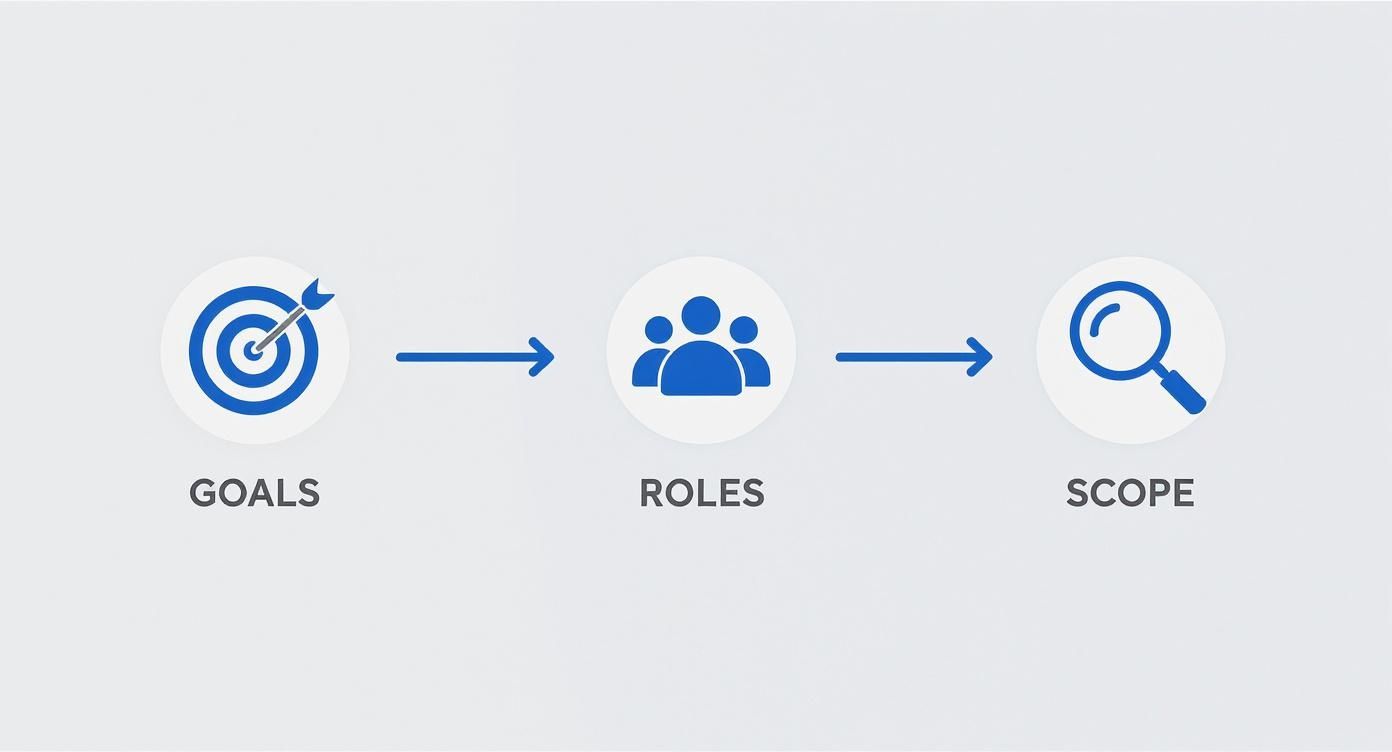
Each piece builds on the last, creating a logical progression that cuts down on ambiguity and gets the entire team aligned on a common purpose.
Establish Clear Goals and Objectives
First things first, you have to answer a fundamental question: "What are we actually trying to achieve here?" The answer needs to be more specific than just "find vulnerabilities." Good goals connect your security efforts directly to business outcomes.
For instance, instead of a vague objective, get specific:
- Compliance: Ensure the new payment module is fully compliant with PCI DSS 4.0 requirements.
- Risk Reduction: Find and fix all high-risk injection vulnerabilities in our public-facing APIs before the Q3 launch.
- Threat Modeling Validation: Confirm that the security controls we put in place to stop unauthorized data access are actually working as designed.
A well-defined objective transforms a generic check into a targeted mission. It gives reviewers a clear purpose, helping them focus their energy on the code that poses the greatest risk to the business.
When you tie security goals to tangible business risks, it becomes much easier to justify the time and resources you're pouring into the review process.
Define Roles and Responsibilities
One of the most common pitfalls is assuming "everyone" is responsible for security. That usually means no one really takes ownership. A proper security code review assigns distinct roles to different people, which brings clarity and accountability to the whole process.
These are the key roles you'll typically see:
- Developers (Code Authors): Their job is to write secure code from the start, understand the vulnerabilities found, and implement solid fixes.
- Reviewers (Peers/Security Champions): These are the people tasked with meticulously inspecting the code, spotting potential flaws, and giving constructive, actionable feedback.
- Security Engineers/Architects: They often lead the review, offer expert guidance on complex vulnerabilities, and help triage findings based on severity.
- Product Managers: They help put the business impact of vulnerabilities into context and prioritize fixes based on product roadmaps and customer needs.
Assigning these roles makes it crystal clear what's expected of everyone and fosters a collaborative environment where each person knows their contribution matters. To support this foundation, it's smart to explore and compare the best enterprise security software solutions that can empower each of these roles.
Determine a Practical Review Scope
Let's be realistic: you can't review every single line of code all the time. Trying to do so just leads to reviewer burnout and shallow analysis. Defining a practical scope is absolutely critical for focusing effort where it counts.
The scope should always be driven by the review's goals and the development context.
Think about these scoping strategies:
- Change-Based Scope: Focus only on new or modified code within a specific pull request. This is perfect for agile, iterative development.
- Feature-Based Scope: Review all the code related to a new, high-risk feature, like user authentication or data encryption.
- Risk-Based Scope: Prioritize reviewing critical parts of the application that handle sensitive data or have a history of security issues.
- Full Application Scope: This is the big one, usually reserved for major releases, brand-new applications, or periodic deep-dive audits.
By carefully defining what is in scope—and just as importantly, what is out of scope—for each review, you create a process that's both manageable and repeatable. This strategic focus ensures that your most critical assets get the attention they deserve, making your security efforts far more effective.
Automating Your First Line of Defense
Let's be real: manual code reviews are essential for digging into complex business logic, but they can't possibly keep up with the pace of modern development. If you're relying only on human eyes to catch every potential bug in every single line of code, you're setting your team up for burnout and, worse, missed vulnerabilities.
The only way forward is to build an automated first line of defense. Think of it as a smart filter that catches all the common, predictable security issues, freeing up your engineers to focus their brainpower on the tricky stuff that actually requires human analysis.
When you integrate security tools directly into the development workflow, you're not just finding bugs—you're shifting the entire process left. Developers get instant feedback right when they're in the code, which is the fastest and cheapest time to fix anything.
Integrating Static Analysis Security Testing
The absolute cornerstone of any automated security program is Static Application Security Testing (SAST). SAST tools are designed to scan your source code (or bytecode) without actually running the application. They're looking for patterns that scream "vulnerability," like the tell-tale signs of SQL injection or potential buffer overflows.
Imagine a SAST tool as a tireless reviewer who has memorized thousands of bad coding patterns and can spot them in seconds. By plugging it directly into your CI/CD pipeline, every commit gets a baseline security check, creating a consistent gatekeeper. This isn't just theory; static analysis has been shown to find up to 22 times more security flaws than dynamic analysis for certain types of vulnerabilities.
Shifting security checks earlier in the development lifecycle is not just a best practice; it's a strategic necessity. By embedding automated security analysis into IDEs and CI pipelines, you transform security from a final, often-rushed checkpoint into a continuous, collaborative process.
Catching these issues early stops simple but dangerous bugs from ever making it to a manual review. In fact, analysis across thousands of apps confirms just how effective this is at scale, and you can discover more insights about these software security findings for yourself.
Scanning for Vulnerable Dependencies
Modern applications are more assembled than built from scratch. We all rely on a massive ecosystem of open-source libraries and third-party dependencies to move faster. But this convenience comes with a cost: a single vulnerable library can punch a hole in your entire application's security.
This is where Software Composition Analysis (SCA), often just called dependency scanning, becomes non-negotiable. These tools automatically map out all the open-source components in your codebase and cross-reference them against databases of known vulnerabilities, like the CVE list.
A typical SCA tool will:
- Build an Inventory: First, it creates a complete Bill of Materials (BOM), listing every single dependency and its exact version.
- Match Vulnerabilities: Next, it compares that list against public and private vulnerability databases to flag any known issues.
- Alert and Report: Finally, it alerts your team, usually providing context on the severity and recommending which version you should upgrade to.
If you're looking to beef up this part of your process, check out our guide on the top automated code review tools that can strengthen your development pipeline.
Preventing Leaked Secrets
One of the most cringe-worthy—and surprisingly common—security blunders is hardcoding secrets. We're talking API keys, database credentials, and private certificates just sitting in the codebase. Once that code gets committed to Git, those secrets are exposed to anyone with access to the repo's history. It's a disaster waiting to happen.
Secrets detection tools are built to stop this exact scenario. They scan your code for patterns that look like common secret formats.
- Pre-Commit Hooks: The smartest place to run these checks is in a pre-commit hook. This is a local check that runs on a developer's machine before the code can even be committed, stopping a secret leak at the earliest possible moment.
- CI/CD Pipeline Checks: Of course, you need a backup. Running these scans again in the CI pipeline acts as a safety net to catch anything that might have slipped past the local checks.
This automated trifecta—SAST, SCA, and secrets detection—forms a powerful foundation. Let's break down how they fit together.
Automated Security Scanning Tool Comparison
To get a clearer picture, here’s a quick comparison of the three core automated scanning tools and where they shine in the development lifecycle.
| Tool Type | Primary Function | Best Use Case |
|---|---|---|
| SAST | Scans your own source code for known vulnerability patterns (e.g., SQL injection, XSS). | Integrated into the CI/CD pipeline and IDE to give developers immediate feedback on the code they are writing. |
| SCA | Identifies all third-party libraries and checks them against known vulnerability databases. | Run on every build to catch newly discovered vulnerabilities in dependencies and to enforce license compliance. |
| Secrets Detection | Scans for hardcoded credentials like API keys, passwords, and private certificates. | Implemented as a pre-commit hook to block secrets before they enter the repository, with a final check in the CI pipeline. |
By weaving these three types of tools into your workflow, you automate the grunt work of finding low-hanging fruit. This allows your manual review efforts to be laser-focused on the complex, context-heavy flaws that only a human expert can truly understand and uncover.
Mastering the Manual Code Review Process
Automated tools are great for catching the low-hanging fruit—common misconfigurations, known vulnerable dependencies, and leaked secrets. But they aren't a silver bullet. The real art and science of a robust security code review happen in the manual process, where a human expert can spot the complex, context-dependent flaws that scanners simply can't see.
This is where you move beyond simple pattern matching. A manual review is about understanding the business logic, tracing data from user input all the way to a database query, and thinking like an attacker to poke holes in the architectural design. It’s the deep-dive analysis that separates a merely compliant security program from a genuinely resilient one.
Thinking Like an Attacker
The most effective manual review starts with a shift in mindset. You're not just a developer checking for bugs; you're an adversary actively trying to break the system. This means questioning every assumption the code makes about its inputs, its environment, and its users.
Start asking yourself critical questions:
- "What if this input isn't what I expect?" Think malicious payloads, oversized data, or unexpected character sets.
- "Can I bypass this control?" Look for ways to skip authorization checks or manipulate the application's state.
- "What's the real business impact here?" A seemingly minor flaw could have catastrophic consequences in the right context.
This adversarial perspective helps you identify vulnerabilities that stem from flawed logic, not just simple coding mistakes. These are precisely the kinds of issues that automated tools, which lack any business context, will almost always miss. For a deeper look into this approach, check out our guide on the best practices for code review to elevate your team's skills.
A Practical Checklist for Common Vulnerabilities
While the attacker mindset provides the framework, a structured checklist ensures you cover all the critical vulnerability classes. Instead of randomly reading code, use a focused approach to hunt for specific types of flaws.
Here are a few high-priority areas to focus your manual security code review efforts:
1. Injection Flaws (SQL, NoSQL, OS Command) This is all about untrusted user data making its way into a command or query.
- Trace the Data: Follow every piece of user input from the HTTP request all the way to the database query or system call.
- Check for Sanitization: Is the input properly validated, sanitized, or parameterized before it gets used? Look for prepared statements (for SQL) or strict allow-lists.
- Real-World Example: A search function that directly concatenates a user's search term into a SQL query is a classic SQL injection risk. A reviewer would immediately flag this and recommend using a parameterized query instead.
2. Broken Authentication and Session Management These flaws are the keys to the kingdom, allowing attackers to impersonate legitimate users.
- Session Token Security: How are session tokens generated, stored, and transmitted? They should be high-entropy and sent only over secure channels (HTTPS).
- Credential Handling: Are passwords properly hashed and salted using a strong, modern algorithm like Argon2 or bcrypt?
- Logout Functionality: Does logging out actually invalidate the session token on the server? Or does it just clear a client-side cookie, leaving the session active?
3. Cross-Site Scripting (XSS) XSS happens when an application includes untrusted data in a new web page without proper validation or escaping, letting an attacker execute scripts in the victim's browser.
- Identify Output Points: Where does user-supplied data get rendered back to the browser? Think search results, profile pages, and even error messages.
- Verify Output Encoding: Is the application using context-aware output encoding? Data placed inside an HTML attribute needs different encoding than data placed inside a
<script>tag.
The big challenge with manual reviews is maintaining effectiveness at scale. The sheer speed of modern software development, especially with AI-assisted code generation, is pushing human capacity to its limits.
In fact, the velocity of modern development makes traditional manual review increasingly difficult. Research shows that human reviewers start losing effectiveness after just 80-100 lines of code. Getting to 95% confidence in finding all vulnerabilities could require up to 14 reviewers for a single piece of code—a model that just isn't sustainable.
By combining the strategic, context-aware insights of a manual review with the speed and scale of automation, you build a layered defense that is both thorough and sustainable. The manual process remains your most powerful tool for uncovering the vulnerabilities that truly matter.
Integrating AI for Smarter Code Reviews
Manual reviews are essential, but let's be honest—they don't scale. As development speed keeps accelerating, relying only on human eyes becomes a serious bottleneck. This is where AI comes in, not to replace your expert reviewers, but to give them superpowers. It makes the whole security code review process smarter, faster, and far more efficient.
The next real leap forward in securing code is to embed intelligent tools directly into the developer's workflow. Think of it as an AI security coach that lives right inside the IDE, giving feedback in real time as the code gets written. This is a huge shift, catching potential problems long before anyone even thinks about creating a pull request.
The AI Security Coach in Your IDE
Modern tools like kluster.ai are built to be this real-time coach. They plug directly into the editor and provide instant analysis of both AI-generated and human-written code, checking it against security policies and best practices in seconds.
This immediate feedback loop changes everything. Instead of waiting hours—or even days—for a manual review, a developer finds out about a potential vulnerability the moment they type it. Missed input validation? Using an insecure crypto function? They know right away. It makes security an interactive, educational part of the job, not some punitive gate they have to pass at the end.
By providing instant, context-aware feedback within the IDE, AI tools transform security from a downstream bottleneck into an upstream enabler. This immediate loop helps developers learn secure coding habits and prevents entire classes of vulnerabilities from ever entering the codebase.
This is just way more effective than the old way. At Uber, their internal AI review tool, uReview, posts feedback minutes after a commit, letting developers fix things before a human reviewer even sees the code. That speed completely cuts out the painful "ping-pong" that drags down so many review cycles.
Moving Beyond Simple Pattern Matching
Traditional SAST tools are pretty good at spotting known bad patterns, but they're notorious for lacking context. The result? A flood of false positives that developers quickly learn to ignore. This is where AI really shines. It uses a much deeper, semantic understanding of the code to tell the difference between a real threat and a harmless quirk.
For a deeper dive into how AI can seriously level up your review process and spot security holes, check out A Developer's Guide to AI Code Review.
AI models don't just see a single line of code. They analyze its relationship to the functions around it, the class definitions, and even the project's documentation. That's how they find the subtle logic flaws that a simple rule-based scanner would sail right past.
- Context-Aware Analysis: An AI tool can figure out the intent behind the code. It can recognize, for instance, that a loop is supposed to remap memory addresses and flag it if the updated value is never actually written back—a logic bug most static scanners can't see.
- Reduced False Positives: With better context comes fewer bogus alerts. Uber's uReview, for example, uses a second AI prompt to score the quality of each suggestion, automatically hiding the low-value noise.
- Focus on High-Impact Issues: Developers have a low tolerance for noisy tools. The best AI reviewers focus on what actually matters, flagging critical bugs and missing error handling while ignoring the trivial style issues that just waste everyone's time.
Enforcing Policies Before Code Is Committed
One of the biggest wins with an in-IDE AI is the power to automatically enforce your organization's security policies and coding standards. Before a developer can even git commit, their AI assistant can verify that the code follows all the established rules.
This means you can automatically check for things like:
- Ensuring the proper encryption libraries are used.
- Blocking deprecated or known-insecure functions.
- Verifying that every new API endpoint has the right authentication checks.
By embedding a tool like kluster.ai directly into the development environment, security stops being an afterthought. It becomes a proactive, seamless part of the workflow. You can enforce a consistent security baseline across every developer's machine, which dramatically cuts down on the number of vulnerabilities that ever make it to the formal review stage.
A security code review isn't over just because you found a vulnerability. The real finish line is crossed only when that flaw is fixed, the fix is verified, and the team learns something valuable from the whole ordeal.
Without a solid process for fixing bugs and measuring your progress, important findings get lost in the backlog. This creates a dangerous false sense of security while real risks are still lurking in your codebase.
https://www.youtube.com/embed/m02n5Rbf60s
The goal here is to create a feedback loop. One that doesn't just squash current threats but actually makes your defenses stronger for the future. It’s all about turning raw findings into actionable fixes, and then turning the data from those fixes into strategic security insights.
Triaging Findings Beyond CVSS Scores
After a review, the first step is always triage. But a classic mistake is to just look at a vulnerability's CVSS score and call it a day. While it’s a helpful starting point, a CVSS score is totally stripped of business context.
Think about it: a "medium" severity vulnerability in a rarely-used internal service is way less urgent than a "low" severity issue in your main payment processing flow.
To get a real sense of priority, you have to weigh a few different factors to understand the true business impact:
- Exploitability: How easy would it be for an attacker to actually find and use this flaw? Do they need to be authenticated? Do they need specialized knowledge?
- Asset Criticality: Is the affected code handling sensitive stuff like PII or financial data? Is it a core part of how your business makes money?
- Potential Damage: What’s the absolute worst-case scenario? Could this lead to data loss, a major service outage, or your company's name getting dragged through the mud?
Answering these questions helps you prioritize fixes based on the actual risk to your organization. It ensures your engineers are spending their valuable time on the things that truly matter.
The sheer volume of alerts from automated tools can be overwhelming. The key is to cut through the noise by focusing on context, which turns a mountain of potential issues into a manageable list of actual risks.
Alert fatigue is a massive problem. A recent benchmark report found that of over 101 million application security alerts, a staggering 95% were either false positives or low-risk noise. By applying business context, organizations slashed the average number of alerts needing attention from over 569,000 to just under 12,000. You can read the full application security research to see just how much context can transform a security workflow.
Building a Repeatable Remediation Workflow
Once a vulnerability is triaged and confirmed, it needs to be dropped into a clear, repeatable workflow. This is where a smooth integration with developer tools like Jira or Azure DevOps becomes non-negotiable.
A solid remediation process usually follows these steps:
- Create a Detailed Ticket: The finding gets logged with every bit of necessary context. This isn't just a one-liner; it needs a clear description of the vulnerability, the exact location in the code, steps to reproduce it, and specific, actionable recommendations for the fix.
- Assign Ownership: The ticket gets assigned to the right developer or team. Clear ownership is the only way to prevent issues from falling through the cracks.
- Track and Verify: The security team keeps an eye on the ticket's progress. Once a developer pushes a fix, it absolutely must be reviewed and verified by a security engineer or a security champion before that ticket can be closed.
This kind of structured process ensures accountability and gives you a clear audit trail for every single vulnerability, from the moment it was discovered to the moment it was resolved. It turns abstract security findings into concrete engineering tasks.
Measuring What Matters for Continuous Improvement
You can't improve what you don't measure. Tracking the right metrics is how you prove the value of your code review program and spot areas that need work. Forget about vanity metrics; focus on data that drives real action.
Here are a few key metrics to get you started:
| Metric | What It Measures | Why It Matters |
|---|---|---|
| Mean Time to Remediate (MTTR) | The average time it takes to fix a vulnerability after it's discovered. | A low MTTR is a great sign of an efficient remediation process and a responsive security culture. |
| Vulnerability Density | The number of vulnerabilities found per 1,000 lines of code. | This helps you benchmark the security quality of different applications or teams over time. |
| Fix Rate | The percentage of identified vulnerabilities that are actually fixed within a given period. | A high fix rate shows that your security program is effective and has real buy-in from engineering. |
Once you start tracking this data, you’ll begin to see patterns. For example, are certain types of vulnerabilities, like XSS, constantly popping up in a specific team's code? That’s not a reason to point fingers; it's a golden opportunity to provide some targeted training.
This data-driven approach is what lets you fine-tune your security policies, update your checklists, and ultimately build a much stronger, more resilient engineering culture.
Got Questions About Security Code Reviews? We've Got Answers.
Jumping into a formal security code review process always kicks up a few questions. That's totally normal. Let's tackle some of the most common ones I hear from teams trying to get this right.
How Often Should We Be Doing These?
Look, there's no magic calendar schedule. The right frequency depends entirely on your team's speed and how much risk you're willing to stomach. Forget thinking in terms of "once a quarter." It's much smarter to bake reviews directly into the way you already build software.
For any team worth their salt running agile, the answer is simple: on every single pull request. This makes security a constant, bite-sized part of the daily routine instead of some massive, dreaded event that brings everything to a halt.
Now, if you're building something extra sensitive—like a brand-new authentication service—it's wise to add a deeper, multi-person audit before it goes live. But for day-to-day work, every PR is the way to go.
What Are the Best Tools for the Job?
There's no single "best" tool. Anyone who tells you otherwise is selling something. A solid strategy layers a few different types of tools to get the best coverage.
Here’s a typical, effective stack:
- SAST (Static Application Security Testing): Tools like SonarQube or Snyk Code are your first line of defense. They automatically scan your codebase for known vulnerability patterns right in your CI/CD pipeline.
- SCA (Software Composition Analysis): You absolutely need something like Dependabot or OWASP Dependency-Check to find known vulnerabilities lurking in the third-party libraries you're using.
- AI-Powered Assistants: This is where things get interesting. Modern tools like kluster.ai live right inside the developer's IDE. They give real-time, context-aware feedback, catching security holes and logic flaws before the code even gets committed.
The smartest play is a blended one. Let automated SAST and SCA handle the low-hanging fruit at scale. Then, use an in-IDE AI tool to give developers instant feedback and enforce your rules. This frees up your human reviewers to hunt for the big, complex stuff—the architectural flaws and tricky business logic vulnerabilities that automated scanners will always miss.
How Do We Get Developers On Board Without a Fight?
Ah, the classic developer pushback. It's almost always rooted in legitimate concerns: crushing deadlines, vague feedback, or the feeling that security is just another bureaucratic hoop to jump through.
If you want to win them over, you have to make security a helper, not a hurdle.
First, stop making it about blame. Frame security as a quality issue. Secure code is well-written code, period. And when you find something, give them clear, actionable advice with examples on how to fix it. Don't just throw a vulnerability report over the wall and expect them to figure it out.
Second, pick tools that don't add friction. An in-IDE tool that gives instant, helpful feedback is going to be embraced. A slow, noisy scanner that breaks the build with a million false positives? Not so much. Show your developers how a good security code review process helps them write better software faster, and you'll turn that resistance into collaboration.
A solid security posture begins where the code is born: in the editor. With kluster.ai, you can automatically catch vulnerabilities and enforce security policies before code ever leaves the developer's machine. It gives real-time, context-aware feedback on both AI-generated and human-written code, cutting out the painful back-and-forth on pull requests. Start free or book a demo and see how instant verification can transform your team's workflow.